Todo
please 80 characters per line max.
Todo
please link to classes where appropriate
CoreJob
Introduction
As of today, modern Data-Scientists use a variety of python- and R-modules both Open- and Closed-Source to create relevant insights based on multiple sets of data from many different sources.
Core4-Jobs are for those Data-Scientists and -Engineers to achieve fault tolerant automation of all needed steps of creating those insights without having the user think about the underlying software or hardware.
core4 takes care of everything that is essential to using and operating such a distributed system, from central logging and configuration to deployment, all this while scaling to the 100ths of servers.
CoreJobs
CoreJobs implement the logic layer of the core4s architecture and enable the user to fully automate their business logic within a fault tolerant distributed system. CoreJobs are the starting point for any Data-engineer or -scientist and provide a lot of possibilities to easily control the runtime-behavior within the framework.
Example
class FirstJob(core4.queue.job.CoreJob):                                  # [1]

    """
    Each 30 minutes, this job counts the occurrences of terms LIEBE and
    HASS in the news feed of Axel Springer's bild.de.
    """

    author = "mra"
    schedule = "*/30 * * * *"                                              # [2]
    attempts = 5                                                           # [3]
    error_time = 120                                                       # [4]

    def execute(self, *args, **kwargs):                                    # [5]
        url = self.config.get('bild.rss',
                              "https://www.bild.de/rssfeeds/vw-alles"
                              "/vw-alles-26970192,"
                              "dzbildplus=true,"
                              "sort=1,"
                              "teaserbildmobil=false,"
                              "view=rss2,"
                              "wtmc=ob.feed.bild.xml")                     # [6]
        self.logger.info('crawling bild.rss = [%s]', url)                  # [7]
        rv = requests.get(url)                                             # [8]

        words = re.sub(
            '\s+', ' ', re.sub('\<.*?\>', '', rv.content, flags=re.DOTALL)
        ).split()                                                          # [9]
        result = {'create': core4.util.node.now()}                         # [10]
        terms = self.config.get_list('terms', [“liebe”, “hass”])           # [11]

        for term in terms:                                                 # [12]
            found = sum([1 for w in words if w.lower().find(term)>=0])     # [13]
            result.setdefault(term, found)                                 # [14]
            self.logger.debug('count [%d] of [%s]', found, term)           # [15]

        target = self.config.collection('term.count')                      # [16]
        target.insert_one(result)                                          # [17]
Explanation:
Down below you can find a more detailed instruction about various aspects of writing CoreJobs:
Principles
CoreJobs implement the logic layer of the core4s architecture. CoreJobs can broadly be categorised into:
- extraction jobs, scanners and feed readers representing inbound interfaces
- load jobs for saving inbound data to the database
- transformation, analysis and aggregation job
- export jobs and feeds representing the outbound interfaces
This differentiation is only from a conceptional view point. All jobs are irrespective of their goal and purpose implemented as CoreJobs.
runtime behavior
A job can have multiple states, depending on its configured runtime-behavior:
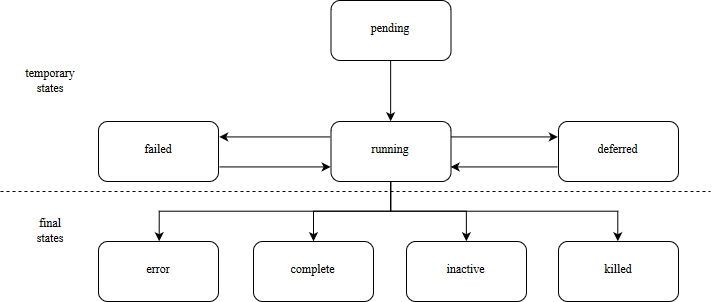
A most important configuration settings are as follows:
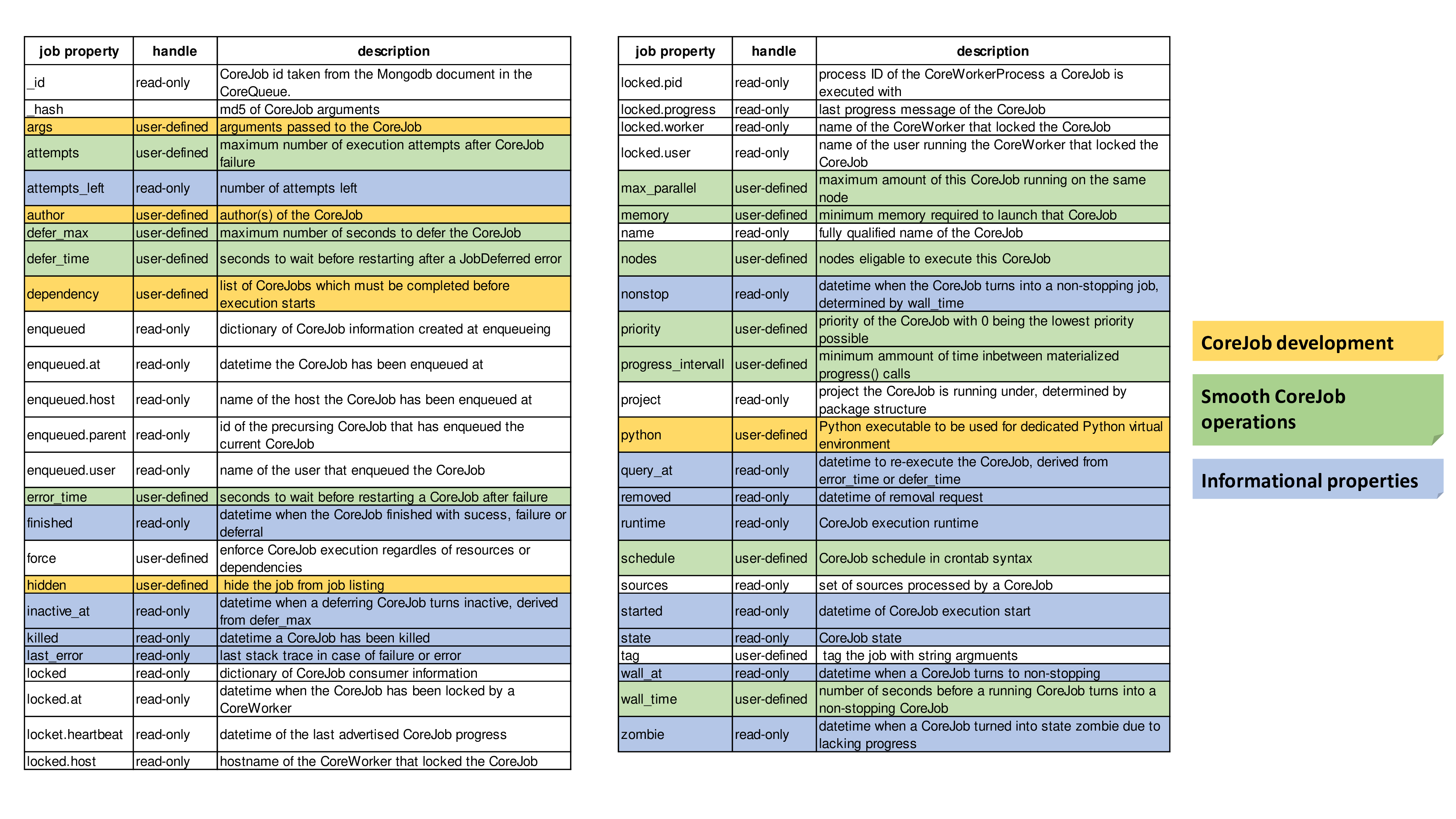
For further information please visit the job section within the package documentation.
Within the code, a job can defer itself:
self.defer("This job has been defered due to various reasons.")
Or enqueue other jobs by their qual_name. All arguments specified will be passed to the CoreJob:
self.queue.enqueue("core4.queue.helper.job.DummyJob", sleep=120)
CoreJobs can also be enqueued using the coco script:
coco --enqueue core4.queue.helper.job.DummyJob sleep=120
Arguments given via commandline will be parsed to json and passed to the
CoreJob as kwargs.
For further information please visit the commandline tools section.
collection handling
core4 ships a great configuration management that can be used to handle multiple different database-connections. Whether to achieve different databases for different jobs, or to simply read from production data while writing to your local database, everything is possible.
The example below takes advantage of core4s configuration inheritance to achieve exactly that. All keys have to first be set within the plugin-configuration itself so that they can be overwritten by the user-specific or the system-wide configuration file:
mongo_url: mongodb://usr:pwd@localhost:27017
mongo_database: bakery
cash_register: mongodb://usr:pwd@production_database:27017/registers/cash_register
low_values: mongodb://low
mid_values: mongodb://mid
high_values: mongodb://high
import core4.util
from core4.queue.job import CoreJob

class CalcSum(CoreJob):
    """
    This is just a small example Job that processes bills in the form of:

    {
      "_id": mongodb_object_id
      "date": 2018-01-01,
      "value": 10.0,
      "positions": {
        "pretzel": 2,
        "bun": 1,
        "cake": 3
      }
    }

    and sorts all transactions by their value into the corresponding collection (low, mid, high).
    """
    author = "mkr"
    schedule = "*/10 * * * *"

    def execute(self, *args, **kwargs):

        low = self.config.low_values
        mid = self.config.mid_values
        high = self.config.high_values

        # find todays bills within the input_collection
        today = core4.util.now()
        today = today.replace(hour=0, minute=0, second=0, microsecond=0)
        # append the searched date to the sources list
        self.sources.append(today)
        data = self.config.cash_register.find({"date": {"$gte": today}})

        # and delete their _id
        for d in data:
            del d['_id']

        # finds all documents with certain values:
        low_data = [i for i in data if i["value"] < 5]
        mid_data = [i for i in data if (i["value"] > 5 and i["value"] < 10)]
        high_data = [i for i["value"] in data if i["value"] > 10]

        # insert found documents into their collection
        low_coll.bulk_write(low_data, ordered=False)
        mid_coll.bulk_write(mid_data, ordered=False)
        high_coll.bulk_write(high_data, ordered=False)
All documents inserted into the database using a CoreCollection carry two additional key:value pairs:
_src: set of sources processed by the CoreJob
_job_id: CoreJob identifier in ``sys.queue``
All class variables set by the developer or configuration options set within the
plugin configuration can be overwritten by using the qual_name of the CoreJob
within the personal ~/.core4/local.yaml or the system-wide
/etc/core4/local.yaml:
core4:
  example:
    CalcSum:
      # this job should be scheduled each 5 min instead of each 10 min.
      schedule: "*/5 * * * *"
      # this job should have a high priority
      priority: 10
logging
core4 ships with 4 log-levels: CRITICAL/ERROR/WARNING/INFO and DEBUG. A CoreJob, as any other class instance derived from CoreBase come with logging already integrated:
from core4.queue.job import CoreJob


class CoreLoggingExample(CoreJob):
    def __init__(self):
        self.logger.critical("A critical, unexpected error appeared")
        self.logger.error("An exception or other expected error has been raised")
        self.logger.warning("This is a warning")
        self.logger.info("This is just another info message")
        self.logger.debug("This is a debug message, it is only shown in case of an error")
You can either use the .format-method of a string or format it the oldschool way:
self.logger.warning("This value is a double: [%d] and here is its string representation: [%s]",double(1), str(1))
The DEBUG level will not be logged by default. It will only be written when an CRITICAL log message has occured. In the context of CoreJobs, CRITICAL messages are reserved for fatal exceptions. This way, one can write multiple DEBUG messages that may help him indentify an error but would otherwise clutter the output.
A job will log all raised expections that are piped to either std::out or std::error by default.
cookie handling
For saving information inbetween runs of the same CoreJob inbetween multiple runs, CoreCookies can be used. CoreCookies are identified by the qual_name of the CoreJob using them.
Think of it as enhanced browser-cookies, a store for multiple key-value pairs.
Cookies are included within the CoreJob itself, as core automatically keeps
track of the last time a worker has tried to execute the job. A datetime object
is stored within the last_runtime key:
{
    "_id" : "core4.queue.helper.job.DummyJob",
    "last_runtime" : ISODate("2018-11-05T09:26:31.156Z")
}
There are multiple predefined methods for accessing and altering key:value pairs.
For setting fields within the key:
self.cookie.set(a, 1)
self.cookie.set(a=1)
For increasing/decreasing a value:
self.cookie.inc(key, value=1)
self.cookie.dec(key, value=1)
Compare the given key with the already present value and take the maximum/minimum:
self.cookie.max(key, value=10)
self.cookie.min(key, value=5)
Get the value of a key:
self.cookie.get(key)
Check wheter a key is present:
self.cookie.has_key(key)
Delete a key:value pair:
self.cookie.delete(key)
Cookies are often used to keep track of already loaded data e.g. by timestamp:
self.cookie.set("last_completed": core4.util.now())
structuring CoreJobs
CoreJobs can inherit from any other classes.
If they inherit from other CoreJobs, all class-properties but schedule,
dependency and chain will be inherited.
To be able to still provide inheritance for eased structuring of CoreJobs, the
class CoreAbstractJobMixin has been provided.
Abstract CoreJob classes are not listed in the job listing, e.g. extracted with
coco --job and can not be launched directly. Abstract CoreJobs are only
providing a blue print for other concrete CoreJob implementations
from core4.queue.job import CoreJob
from core4.queue.helper.job.base import CoreAbstractJobMixin


class Parent(CoreJob, CoreAbstractJobMixin):
    author = "mkr"

    def static_mult(x, y):
    """
    example method to be used by concrete classes inheriting from Parent
    """
        return x*y
    ...


class Child(Parent):
    author = "mkr"
    schedule = "* 3 * * *"

    def execute(self, x, y):
        result = self.static_mult(x, y)
        self.logger.info("Got result within the multiplication: [%d]", result)
Job Execution without Worker Daemon
For development and debugging purposes you want to directly execute a job without the prerequisite to enqueue the job and to run a worker daemon.
Use method .execute from the core4.queue.helper.functool module as
described in the following example.
from core4.queue.job import CoreJob
from core4.queue.helper.functool import execute

class JobExample(CoreJob, you="world"):
    def __init__(self):
        self.logger.info("hello %s", you)

if __name__ == '__main__':
    execute(JobExample, you="people")
Access Permissions
job://…/x|r
There are two flags who determine the permission of a Job:
- x
- Execute flag, this allows the job to be accessed, changed and executed without restrictions.
- r
- Read Flag, this only allows for basic job info to be read, it prevents the job from being changed and executed and only allows for the job info to be read.
Best practices
When writing CoreJobs (or any part of software really), it is advisable to adhere to the following design paradigms:
divide and conquer
divide a big task into multiple smaller parts. The smaller the Task, the easier to scope, to maintain and to follow along for others. It also encourages you to follow the next point made here:
do one thing and do it well
Do not try to: “I’ll fix everything in one method”. Separate logical building-blocks from your code, every block should only do one single task. This makes it easier to implement changes in the future and helps your code to be more readable.
- KISS - keep it simple and stupid
Robustness and maintainability are more precious than saving a few seconds of time. This however is not valid for the correctness of an algorithm. Aim your complexity as high as it has to be but as low as it needs to be.
Both guidelines are interrelated. The dotadiw (do one thing and do it well) philosophy is borrowed from the general Unix philosophies. Actually, the design of automation jobs should follow the first four out of nine guidelines:
- Small is beautiful
- The less code, the easier it is for someone else to understand it, even if that someone is your future self.
- Make each program do one thing well
- do not mix several steps of a processing chain into one document. Separate in e.g. load-Job, transform-Job and report-Job.
- Build a prototype as soon as possible
- if you do start programming, try reaching the state of a working prototype as soon as possible. This way, you’ll notice errors in your concept way earlier, stumble open flaws in your design and you will speed up your overall developing speed.
- Choose portability over efficiency
- The more independent your code is from environmental-specific changes, the more robust it will be. If you set e.g. set low timeouts, the job may unnecessarily fail when running on high-load nodes.
Out of experience we would recommend to adhere to the following principles also:
- design your applications with restartability in mind
- There are multiple reasons why a job might fail, including only temporary failures (imagine a website you crawl being in maintenance). You can safe yourself a lot of hassle if the job itself knows about its state and can simply be restarted without being worried about data-loss or crashing dependencies.
- create Data-Structures that are idempotent on multiple loads
- you may find yourself in the position where you do not know whether a certain job has processed a particular set of data or not. It is elegant to just be able to enqueue that particular job that either only updates the data if changes are detected or simply updates already present documents. That way you do not have to worry about overwriting critical output.
- implement continuity-checks if data is continuous
- even if your jobs always run to perfection, some of your clients may not. If you have a continuous data stream (e.g. a daily reporting via excel) always check that data for completeness. It is easier to let a job fail if expected data is not present than to try to retrospectively fix a processing-chain.
- robustness before neatness
- python offers some really nice features for writing clean and easy-to-understand code. An experienced programmer might feel tempted to implement the fastest, most efficient way for doing some kind of task. However, speed alone should not always be the sole goal of software-design. Keep in mind that many more people might be reliant on working on and understanding your code, this even includes your future self.
- work silently, fail noisily
- if your job runs without error, there is no need to log. If however an error occurs, expect to need as much information as possible to fix it. core4 enables you to do this by only logging DEBUG-messages in case of an error, but still, you are the one that has to implement these messages.
- build modular and reusable classes and functions
- there always will be multiple parts of a program that can be reused somewhere else. Rather than duplicating that code on every place it is needed, simply uncouple the part that is often reused. Not only will your code look more clean, you also do save yourself a lot of time if you need to enhance or fix that particular part of code.
- choose meaningful function-/class-/variable-names
- choosing simple, yet descriptive names will greatly help you maintain or extend your code.