configuration
System configuration of various kind are the bridge between core4 development and operations activities. Key features of core4 configuration are:
- to keep sensitive data safe and keep naive staff and smart hackers out.
- to make the life of system administrators easy. The config system supports
various configuration sources, e.g. configuration files, a central mongodb
sys.confcollection, user configuration files, default values, OS environment variables as well as project specific config files. Administrators choose their weapons. - to make the life of data scientists and developers easy. The config system supports cross-database application development, local and remote sources, and a hierarchical connection configuration mechanic which speed up the most critical ingredient to efficient programming: data access.
sources of configuration
There are multiple places where core4 is looking for configuration.
- The core4 configuration file
core4.yaml, see standard configuration. This file provides standard values. - The project configuration file for project specific settings in
[project]/[project].yaml. This file is part of the project repository and is considered to provide project specific default values. - The optional local configuration file. If the special environment
variable
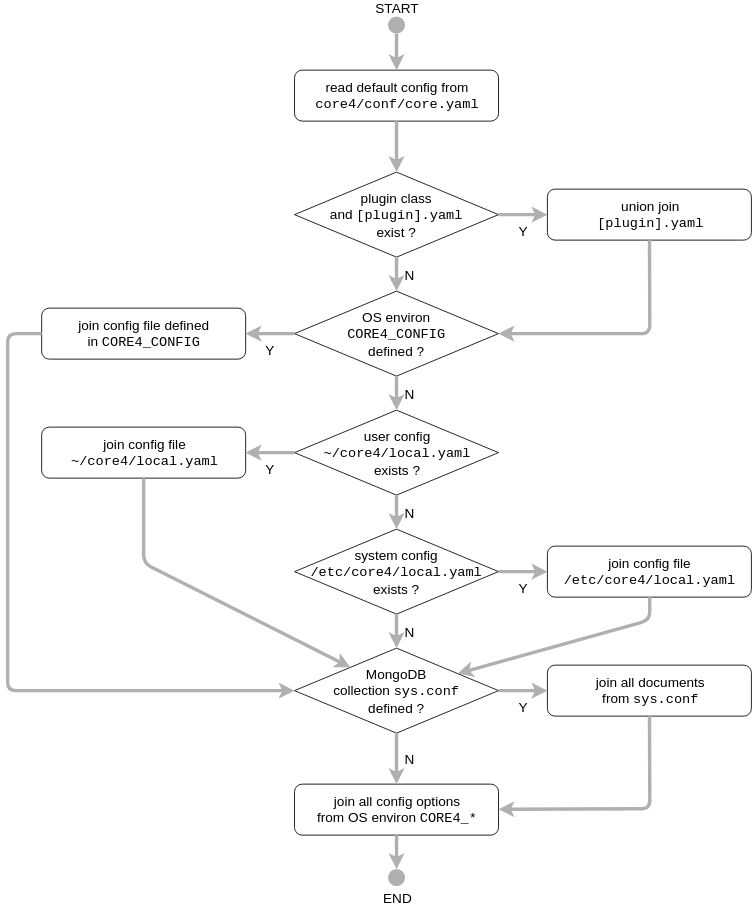
CORE4_CONFIGlocates an existing file, then this file is processed. If the variable is not defined, then the user file~/core4/local.yamlis processed if it exists (local user configuration). If this file does not exist, then the local system configuration file/etc/core4/local.yamlis parsed if it exists. If none of these options apply, then local configuration is skipped. - The optional MongoDB configuration documents in collection
sys.confare processed if defined. If the MongoDB collectionsys.confis specified in any of the previous locations, then any existing keys/values are overwritten. - Environment variables
CORE4_OPTION_foo__barcan be defined to set configuration values (see environment options and values).
If more than one source specifies a configuration key, then the last value
wins. Local configuration takes precedence over standard core4 and project
values. Collection sys.conf takes precedence over local configruation.
Finally environment variables have the top most priority to set configuration
values.
Note
Expected file extension for all YAML files is lower case .yaml.
This boils down to the configuration flow outlined in the following diagram:
Warning
Administrators and operators often take the application’s
configuration file and copy&paste the whole content into the
concrete system configuration file. This is not the intended
mechanic of core4 configuration. The configuration sources
described above represent a cascade. Specify only those
configuration settings for your local setup which are different
to the standard configuration as defined in core4 and project
configuration. Use local configuration files or the MongoDB
collection sys.conf for your specific settings.
configuration language and format
core4 configuration uses YAML as the configuration language (see http://yaml.org/) and the PyYaml Python package supporting YAML version 1.1.
YAML is a human-readable data serialization language using both Python-style
indentation to indicate nesting, and a compact format that uses [] for
lists and {} for maps.
YAML natively encodes scalars (such as strings, integers, floats and boolean), lists, and dictionaries. Lists and hashes can contain nested lists and hashes, forming a tree structure.
YAML parses the type of configuration values. All quoted values represent strings. Non-quoted values are parsed into integers, floats, booleans and dates. Use YAML default tags to explicitely define the value type (see for example http://sweetohm.net/article/introduction-yaml.en.html).
core4 implements a custom tag !connect to express database access. See for
example an excerpt from core4.yaml standard configuration file:
sys:
  log: !connect mongodb://sys.log
  role: !connect mongodb://sys.role
Note
The YAML syntax only applies to file based configuration, i.e. the
configuration file specified in the environment variable
CORE4_CONFIG, the user configuration file as well as the system
configuration file. All configuration specified by environment
variables (CORE4_CONFIG_...) as well as the bodies in
MongoDB collection sys.conf represent the configuration keys and
values. Still the !connect tag is processed.
project configuration
All project configuration is wrapped in a dictionary with the key equal to the project name.
Example project configuration file test.yaml for project test:
username: peter
password: ~
To access the username and password use:
config.test.username == "peter"  # True
config.test.password is None  # True
DEFAULT values
The DEFAULT dictionary defines default keys/values. These default values
are forwarded into all configuration dictionaries:
DEFAULT:
   mongo_database: core4
   mongo_url: mongodb://localhost:27017

sys:
   mongo_databaes: section1db
This YAML example implements the following configuration values:
config.mongo_database == "core4"  # True
config.mongo_url == "mongodb://localhost:27017"  # True
config.sys.mongo_database == "section1db"  # True
config.sys.mongo_url == config.mongo_url  # True
config.sys.mongo_url == "mongodb://localhost:27017"  # True
project configuration features a DEFAULT dictionary, too. The default keys
and values defined in the project configuration apply to the project
configuration only. Consequently, if a project key in a section is not defined,
then the project default value applies if it is defined. If the project
configuration does not define a default value and a standard value is
defined, then this global default value is forwarded.
Note
The project configuration as well as local configuration can provide a
DEFAULT dictionary, too.
local configuration
The local configuration is used to overwrite core4 standard and project
configuration keys/values for your concrete system setup. You can only specify
keys which are either present in core4 standard (core4.yaml) or
project configuration. All other keys/values are silently ignored.
environment options and values
As an administrator you can enforce configuration option values by defining environment variables. The structure is:
CORE4_OPTION_[key]__[value]
CORE4_OPTION_[key]__[sub_key]__[value]
Note the double underscore characters separating the keys and the value. There can be multiple keys.
Parsing of environment variables uses the YAML default tags !!int,
!!float, !!bool, !!timestamp, !!str to parse type information.
Furthermore the custom !connect tag is available (see
!connect tag).
Example:
CORE4_OPTION_logging__stderr="INFO"
CORE4_OPTION_logging__exception__capacity="!!int 5000"
Use ~ to set a value to None:
CORE4_OPTION_logging__stderr="~"
!connect tag
core4 configuration provides a special tag !connect to manage database
connection settings. This tag parses authentication/hostname information,
database and collection name.
A fully qualified connection string to a MongoDB database testdb,
collection result at localhost, port 27017, authenticated with
username user and password pwd is:
coll: !connect mongodb://user:pwd@localhost:27017/testdb/result
If no hostname is specified, then the connection URL is taken from variable
mongo_url. If no database name is specified, then it is taken from
variable mongo_database. Therefore, the following three examples all
cascade to the same connection settings:
DEFAULT:
  mongo_url: mongodb://usr:pwd@localhost:27017
  mongo_database: test

section1:
    mongo_database: db
    result1: mongodb://usr:pwd@localhost:27017/db/result
    result2: mongodb://db/result
    result3: mongodb://result
Asynchronous versus synchronous database access
core4 uses both the pymongo and the motor MongoDB database access
driver. The synchronous pymongo driver is used by the core4 job
execution framework. The asynchronous motor driver is used in
conjunction with tornado ioloop in the core4 web service API framework.
To simplify MongoDB database connection all core4 classes derived from
CoreBase automatically request synchronous connection. All core4
classes derived from CoreRequestHandler connect asynchronous with
motor.
The following snippet demonstrates the default synchronous database access
with CoreBase:
>>> from core4.base.main import CoreBase
>>> b = CoreBase()
>>> b.config.sys.queue
!connect 'mongodb://sys.queue'
>>>
>>> b.config.sys.queue.concurr
False
>>> b.config.sys.queue.count_documents({})
7
You can programmatically change from synchronous to asynchronous access:
>>> b = CoreBase()
>>> b.config.sys.queue.concurr = True
>>> await b.config.sys.queue.count_documents({})
7
You can also use the explicit method .connect_async:
>>> b = CoreBase()
>>> b.config.sys.queue.connect_async()
>>> await b.config.sys.queue.count_documents({})
The following example demonstrates the default connection setting with
CoreBaseHandler. This class is the parent class of
CoreRequestHandler:
>>> from core4.api.v1.request.main import CoreBaseHandler
>>> base = CoreBaseHandler()
>>> base.config.sys.queue.concurr
True
>>> await base.config.sys.queue.count_documents({})
7
Note
There are certain connections within the core4 ReST API
framework which use synchronous database connectivity. These are
connections to collection sys.log and sys.event where core4
utilises special MongoDB features of write concern for performance
reasons. For this special database access we to build on top of the
asycnhronous ioloop feature.
MongoDB collection sys.conf
If you prefer to use a central MongoDB database collection to setup your
system, then you will have to provide the connection string. The standard
core4 configuration disables the sys.conf setting (see standard configuration).
Either setup a local configuration file like this:
sys:
  conf: !connect mongodb://hostname:port/database/collection
Beware to replace hostname, port, database and collection with your actual settings and provide credentials to access the database if necessary.
Alternatively you can define the environment variable
CORE4_OPTION_sys__conf with the above connect statement:
CORE4_OPTION_sys__conf="!connect mongodb://hostname:port/database/collection"
configuration access
All classes based on CoreBase have configuration access via the
self.config attribute. To access configuration options and values you can
either use plain dictionary syntax as in self.config["mongo_database"] or
by dot notation as in self.config.mongo_database.
example
core4 configuration principles are best described by example.
In this scenario a project has been created for an project named project1.
As part of the automation workflow for this project some 3rd party web API is
used to download data on a regular basis. The project configuration is supposed
to provide API authorisation data, the URL for the web service as well as the
target database and collection to store the downloaded data.
Therefore the project developer has created a dictionary api in the project
configuration file project1.yaml located in the package directory.
Furthermore the developer directs all database access to the default database
for this project db1:
# file: project1/project1.yaml

DEFAULT:
  mongo_database: db1
api:
  url: https://example.org/api/v1/download
  username: prod-user
  password: ~  # to be defined by local setup
  download_collection: !connect mongodb://download
Since the project configuration is version controlled and part of the code repository, the developer provides the (default) API user, but no sensitive data, e.g. the API password.
During development of the project, the developer works with the following user
configuration file located at ~/core4/local.yaml:
# file: ~/core4/local.yaml

DEFAULT:
  mongo_url: mongodb://localhost:27017

project1:
  api:
    username: test-user
    password: 123456
This setup allows the developer to use his or her test-user with valid
credentials during implementation and to address the local MongoDB instance at
mongodb://localhost:27017/db1/download. Please note that the hostname/port
comes from ~/core4/local.yaml` while the database ``db1 and the collection
download comes from the project configuration in project1.yaml.
After implementation is complete and during deployment the operator extends
core4 system configuration in production located at /etc/core4/local.yaml
with:
# file: /etc/core4/local.yaml (excerpt)

DEFAULT:
  mongo_url = mongodb://core:mongosecret@mongodb.prod:27017

project1:
  api:
    password: secret
This production setup provides actual credentials for the (default) API user
prod-user and the production database located on server mongodb.prod.
The fully qualified download collection now points to
mongodb://core:mongosecret@mongodb.prod:27017/db1/download
After several weeks with downloaded data the need arises to aggregate the data
into a reporting collection. The developer, who has read-only access grants at
mongodb.prod (username pete, password mysecret) extends the project
configuration project1.py with:
# file: project1/project1.yaml

DEFAULT:
  mongo_database: db1
api:
  url: https://example.org/api/v1/download
  username: prod-user
  password: ~  # to be defined by local setup
  download_collection: !connect mongodb://download
  report_collection: !connect mongodb://report
To facilitate implementation activities and to work with actual production data
the developer extends his ~/core4/local.yaml to read (only) the downloaded
data from production with:
# file: ~/core4/local.yaml

DEFAULT:
  mongo_url: mongodb://localhost:27017

project1:
  api:
    username: test-user
    password: 123456
    download_collection: connect mongodb://pete:mysecret@mongodb.prod/db1/data
Now the report collection addresses mongodb://localhost:27017/db1/report
with hostname/port coming from local.yaml and database and collection
coming from project.yaml. The developer can read-only access production
data by overwriting download_collection in his local.yaml.
This example show, how to create valid project configuration settings which can
be overwritten easily for development as well as production needs. With the
!connect tag the developer furthermore can easily create cross
database connections which simplifies implementation activities if the
developer has for example read-only access to production data.
All configuration files - project1.yaml, ~/core4/local.yaml and
/etc/core4/local.yaml in this example - can be created and maintained
independent of each other.